---
title: "Tip of the Week: How to Type Special Symbols - Telesys Voice and Data Blog"
description: "The Internet has made it possible to do business with companies on the other side of the world. With Windows 10, it’s never been easier to communicate with businesses in other languages."
url: "https://mail.dfwphones.com/blog/tip-of-the-week-how-to-type-special-symbols"
date: "2026-06-05T23:56:37+00:00"
language: "en-GB"
---
## Telesys Voice and Data Blog
Telesys Voice and Data has been serving the Dallas/Fort Worth area since 1994, providing IT Support such as technical helpdesk support, computer support, and consulting to small and medium-sized businesses.
[ Categories ](https://mail.dfwphones.com/blog/categories "Categories")
[ Tags ](https://mail.dfwphones.com/blog/tags "Tags")
[ Categories: All Categories ](https://mail.dfwphones.com/javascript:void(0); "Categories")
Search...Suggested keywords
[ x ](https://mail.dfwphones.com/javascript:void(0);)
# Tip of the Week: How to Type Special Symbols
[Telesys Voice and Data Blog](https://mail.dfwphones.com/blog/categories/blog) [How To](https://mail.dfwphones.com/blog/categories/how-to)
[Telesys Voice Data Solutions](https://mail.dfwphones.com/blog/blogger/telesys-admin)
Wednesday, 10 January 2018
[ 0 Comments ](https://mail.dfwphones.com/blog/tip-of-the-week-how-to-type-special-symbols#comments)
[  ](//mail.dfwphones.com/images/easyblog_shared/January_2018/1-10-18/green_background_letters_400.jpg "Tip of the Week: How to Type Special Symbols")
The Internet has enabled businesses to establish relationships on a global scale. Now, an upscale restaurant in Minneapolis can use the Internet to order ingredients from a vendor in Bordeaux. However, there can easily be a language difference when doing business internationally. This is when it is fortunate that Windows 10 makes it so easy to change your device’s language.
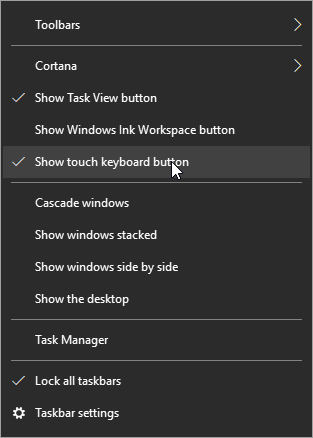
The first thing you should do is right-click on the taskbar and select **Show touch keyboard button** on the menu that appears.
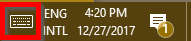
An icon resembling a keyboard will now display in your taskbar next to your clock and calendar.
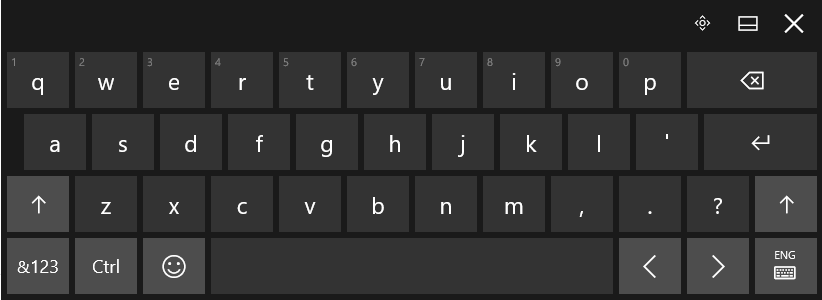
Clicking this icon will bring up a touch-enabled keyboard. If your device doesn’t have touch capabilities, you can also select keys with your mouse.
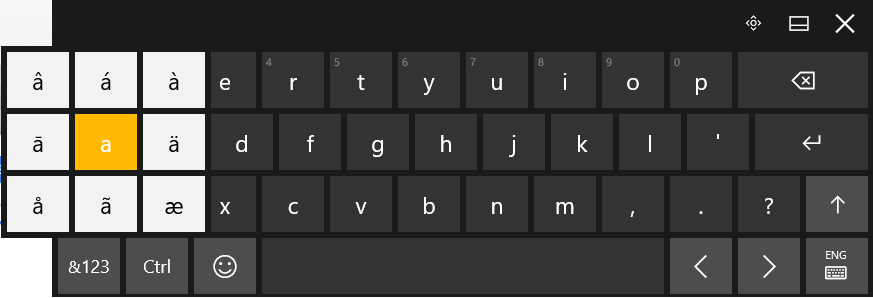
To insert a letter with an accent mark, click and hold the base letter until the available options appear. Click the option you need to insert, and voila!
However, if you need to write in a different language regularly enough that the above option isn’t convenient, you can change the layout of your keyboard to suit your needs. Returning to the bottom-right corner of your screen, you can find your chosen language next to the touch keyboard icon.
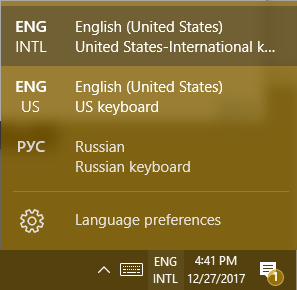
Changing this language will also alter how your physical keyboard works. If the language you need to use doesn’t appear in the list of available languages, you can edit this list (and possibly add the language you need) in the **Language preferences** menu item.
**For Other Versions of Windows, Use ALT Codes**
If you’re still using an older version of the Windows OS, like Windows 7, 8.1, or even Vista or XP (which we don’t recommend), you can use ALT Codes to insert symbols or letters augmented with assorted accent marks. Each option of symbol or augmented letter has a numeric code assigned to it that allows you to insert that symbol or letter by holding the ALT key and typing the code into your numeric keypad. You can find a good resource [here](https://www.alt-codes.net/).
Are there any tricks you have for communicating in another language on your computer? Share them below! Partagez-les ci-dessous! Ossza meg őket lent! Compartilhe-os abaixo!
[ ](https://mail.dfwphones.com/javascript:void(0);) [ ](https://mail.dfwphones.com/javascript:void(0);) [ ](https://mail.dfwphones.com/javascript:void(0);)
Tags:
[Tip of the Week](https://mail.dfwphones.com/blog/tags/tip-of-the-week) [Language](https://mail.dfwphones.com/blog/tags/language) [Windows 10](https://mail.dfwphones.com/blog/tags/windows-10-1)
[ Where the Internet Stands in 2018 ](https://mail.dfwphones.com/newsletter-content/where-the-internet-stands-in-2018)
[ Mobile Security Showdown: Cellular Network vs. Wi-... ](https://mail.dfwphones.com/blog/mobile-security-showdown-cellular-network-vs-wi-fi)
About the author
[  ](https://mail.dfwphones.com/blog/blogger/telesys-admin)
[Telesys Voice Data Solutions](https://mail.dfwphones.com/blog/blogger/telesys-admin)
[ ](https://mail.dfwphones.com/blog/blogger/telesys-admin)
Author's recent posts
[More posts from author](https://mail.dfwphones.com/blog/blogger/telesys-admin)
[ Tuesday, 30 June 2026 Stop Managing Metal, Start Managing People: A Guide to Hybrid IT ](https://mail.dfwphones.com/newsletter-content/stop-managing-metal-start-managing-people-a-guide-to-hybrid-it)
[ Saturday, 27 June 2026 Free AI is Not Free: Why Public Tools Are a Security Risk ](https://mail.dfwphones.com/newsletter-content/free-ai-is-not-free-why-public-tools-are-a-security-risk)
[ Thursday, 25 June 2026 Phishing is Getting Sophisticated: The New Threats Businesses Face ](https://mail.dfwphones.com/newsletter-content/phishing-is-getting-sophisticated-the-new-threats-businesses-face)
Comments
No comments made yet. Be the first to submit a comment
**** Already Registered? [Login Here](https://mail.dfwphones.com/home/login-logout?return=aHR0cHM6Ly9tYWlsLmRmd3Bob25lcy5jb20vYmxvZy90aXAtb2YtdGhlLXdlZWstaG93LXRvLXR5cGUtc3BlY2lhbC1zeW1ib2xz)
Friday, 05 June 2026
Subscribe to the blog (Please fill in your email address to subscribe to updates from this post.)
**Captcha Image**
## Schema
```json
{
"@context": "https://schema.org",
"@type": "BreadcrumbList",
"itemListElement": [
{
"@type": "ListItem",
"position": 1,
"name": "Home",
"item": "https://mail.dfwphones.com"
},
{
"@type": "ListItem",
"position": 2,
"name": "Blog & News",
"item": "https://mail.dfwphones.com/blog"
},
{
"@type": "ListItem",
"position": 3,
"name": "Telesys Voice Data Solutions",
"item": "https://mail.dfwphones.com/blog/blogger/telesys-admin"
},
{
"@type": "ListItem",
"position": 4,
"name": "Tip of the Week: How to Type Special Symbols",
"item": "https://mail.dfwphones.com/blog/tip-of-the-week-how-to-type-special-symbols"
}
]
}
```