---
title: "Your Eyes Will Thank You if You Try This Microsoft Word Dark Mode Trick - Telesys Voice and Data Blog"
description: "For this week’s tip we explore the dark mode in Microsoft Word."
url: "https://mail.dfwphones.com/blog/your-eyes-will-thank-you-if-you-try-this-microsoft-word-dark-mode-trick"
date: "2026-06-05T23:58:58+00:00"
language: "en-GB"
---
## Telesys Voice and Data Blog
Telesys Voice and Data has been serving the Dallas/Fort Worth area since 1994, providing IT Support such as technical helpdesk support, computer support, and consulting to small and medium-sized businesses.
[ Categories ](https://mail.dfwphones.com/blog/categories "Categories")
[ Tags ](https://mail.dfwphones.com/blog/tags "Tags")
[ Categories: All Categories ](https://mail.dfwphones.com/javascript:void(0); "Categories")
Search...Suggested keywords
[ x ](https://mail.dfwphones.com/javascript:void(0);)
# Your Eyes Will Thank You if You Try This Microsoft Word Dark Mode Trick
[Telesys Voice and Data Blog](https://mail.dfwphones.com/blog/categories/blog) [Tip of the Week](https://mail.dfwphones.com/blog/categories/tip-of-the-week)
[Telesys Voice Data Solutions](https://mail.dfwphones.com/blog/blogger/telesys-admin)
Wednesday, 01 July 2020
[ 0 Comments ](https://mail.dfwphones.com/blog/your-eyes-will-thank-you-if-you-try-this-microsoft-word-dark-mode-trick#comments)
[  ](//mail.dfwphones.com/images/easyblog_shared/July_2020/7-1-20/295652108_dark_mode_400.jpg "Your Eyes Will Thank You if You Try This Microsoft Word Dark Mode Trick")
If you spend a lot of time in front of a computer, eye strain can be a big problem. Staring at a screen for too long can be irritating, and some even experience headaches and exhaustion from it.
Fortunately, a lot of common applications have been deploying **dark** or **night modes**. Microsoft Word’s take on this has been, well, less than desirable. We’ll show you a way around it to help save your eyeballs a lot of strain.
**Dark mode** and **Night mode** options have been showing up a lot lately, especially in mobile apps. Twitter, Amazon Kindle, Evernote, Gmail (on Android 10), and Firefox (on iOS) have all deployed a mode that makes the background of the application dark, and the text light.
For most, this makes it easier to view your screen in a dimly lit area without straining your eyes. For those of us who spend a lot of time in front of screens, it can be a huge difference.
I was using Microsoft Word the other day, and working on a long document and I was starting to feel a headache coming on. It reminded me that Word had some settings for changing the theme, and I wondered if they had finally added a dark mode.
(Note that I’m using the PC version of Microsoft Word, not the mobile version)
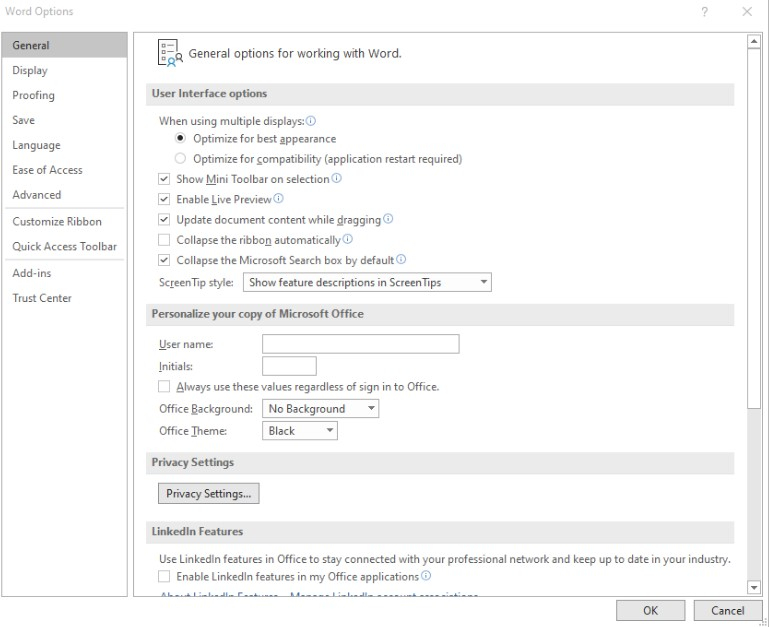
While in Word, click **File** and go to **Options**. On the **General** tab, under **Personalize your copy of Microsoft Office**, you can change the **Office Theme** to **Black**.
I got pretty excited because it seemed like that was exactly what I was looking for, but to my chagrin…
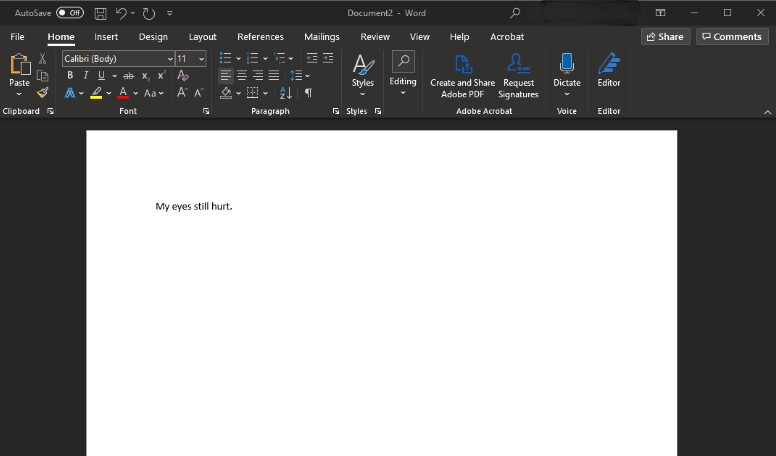
Alright, so changing the **office theme** only makes the surrounding area (including the tool ribbon) darker. That’s a start, but the brilliant bright white of the document area was still burning away at my retinas. I wasn’t totally content with this, but I found a trick that takes this one step further.
## The Trick for a Real Microsoft Word Dark Mode
I totally understand why Microsoft Word doesn’t let the **office theme** change the background and font color of the document. Afterall, a lot of documents get printed or sent as PDFs, and they want you to get a feel for what the document would look like if you were to print it. They don’t want the user getting confused and thinking that it will actually make them print a full sheet with a black background and white text.
This rationality wasn’t doing much for my headache, and I was determined to find a fix for it.
It’s actually really easy too!
NOTE: I want to point out that I definitely **do not** want to print my document with a black background and white text, I only want to view the document that way when I’m editing the document.
Go to the **Design** tab on the tool ribbon at the top of Word and click on **Page Color**.
If you don’t see **Page Color**, try clicking on the **Magnifying Glass** at the very top of Word towards the right, and type **Page Color** instead.
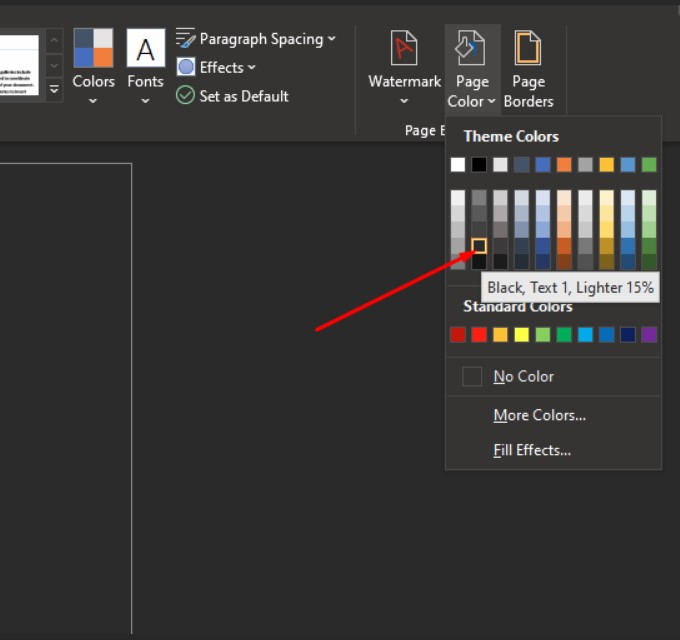
From there, choose one of the darker colors. You’ll notice your document will change as you hover over the different color options. The lower values tend to make the text light. I usually choose the second option from the bottom in the second column, as indicated above.
If you ever want to switch it back, go back to the **Page Color** option and just choose the white box on the top left of the color grid.
Keep in mind that this only changes on the document you are working on, and doesn’t affect your other documents. If you save the document and share it, and someone else opens it, they will also see the dark background.
## Before Printing, Be Sure to Preview
I had no problem printing my document after changing these settings, but older versions of Microsoft Word might not behave the same way. Let’s say you did want to print this document, but obviously didn’t want to waste a ton of ink by printing a black background.
In my experience, you just need to print the document normally, but just to be safe, you can either go back to **Page Color** and set the color back to white, or before you print, review the preview Word shows you.
If the preview is white text on a black background, you’ll need to either go back to **Page Color** and switch to a white background, or you can tell Word to always ignore your background colors.
To do this, click on **File** and **Options**. Go to the **Display** tab and look for the **Printing Options** area. Make sure **Print Background Colors and Images** is unchecked, and click **Ok**.
Then, you never have to worry about wasting a ton of ink when you print your document.
Hope this tip helped! For more great tips, keep coming back to our blog!
[ ](https://mail.dfwphones.com/javascript:void(0);) [ ](https://mail.dfwphones.com/javascript:void(0);) [ ](https://mail.dfwphones.com/javascript:void(0);)
Tags:
[Quick Tips](https://mail.dfwphones.com/blog/tags/quick-tips) [Microsoft Office](https://mail.dfwphones.com/blog/tags/microsoft-office) [Tip of the Week](https://mail.dfwphones.com/blog/tags/tip-of-the-week)
[ FBI Warns About Banking Scams ](https://mail.dfwphones.com/blog/fbi-warns-about-banking-scams)
[ Managed IT Services for Your Remote Workforce ](https://mail.dfwphones.com/newsletter-content/managed-it-services-for-your-remote-workforce)
About the author
[  ](https://mail.dfwphones.com/blog/blogger/telesys-admin)
[Telesys Voice Data Solutions](https://mail.dfwphones.com/blog/blogger/telesys-admin)
[ ](https://mail.dfwphones.com/blog/blogger/telesys-admin)
Author's recent posts
[More posts from author](https://mail.dfwphones.com/blog/blogger/telesys-admin)
[ Tuesday, 30 June 2026 Stop Managing Metal, Start Managing People: A Guide to Hybrid IT ](https://mail.dfwphones.com/newsletter-content/stop-managing-metal-start-managing-people-a-guide-to-hybrid-it)
[ Saturday, 27 June 2026 Free AI is Not Free: Why Public Tools Are a Security Risk ](https://mail.dfwphones.com/newsletter-content/free-ai-is-not-free-why-public-tools-are-a-security-risk)
[ Thursday, 25 June 2026 Phishing is Getting Sophisticated: The New Threats Businesses Face ](https://mail.dfwphones.com/newsletter-content/phishing-is-getting-sophisticated-the-new-threats-businesses-face)
Comments
No comments made yet. Be the first to submit a comment
**** Already Registered? [Login Here](https://mail.dfwphones.com/home/login-logout?return=aHR0cHM6Ly9tYWlsLmRmd3Bob25lcy5jb20vYmxvZy95b3VyLWV5ZXMtd2lsbC10aGFuay15b3UtaWYteW91LXRyeS10aGlzLW1pY3Jvc29mdC13b3JkLWRhcmstbW9kZS10cmljaw==)
Friday, 05 June 2026
Subscribe to the blog (Please fill in your email address to subscribe to updates from this post.)
**Captcha Image**
## Schema
```json
{
"@context": "https://schema.org",
"@type": "BreadcrumbList",
"itemListElement": [
{
"@type": "ListItem",
"position": 1,
"name": "Home",
"item": "https://mail.dfwphones.com"
},
{
"@type": "ListItem",
"position": 2,
"name": "Blog & News",
"item": "https://mail.dfwphones.com/blog"
},
{
"@type": "ListItem",
"position": 3,
"name": "Telesys Voice Data Solutions",
"item": "https://mail.dfwphones.com/blog/blogger/telesys-admin"
},
{
"@type": "ListItem",
"position": 4,
"name": "Your Eyes Will Thank You if You Try This Microsoft Word Dark Mode Trick",
"item": "https://mail.dfwphones.com/blog/your-eyes-will-thank-you-if-you-try-this-microsoft-word-dark-mode-trick"
}
]
}
```